For Hotel & Venue TeamsOne document.
One document.
Every event detail.
The Functional Prospectus captures everything: venue setup, AV, F&B, staffing and billing in one structured form inside the Spalba dashboard.
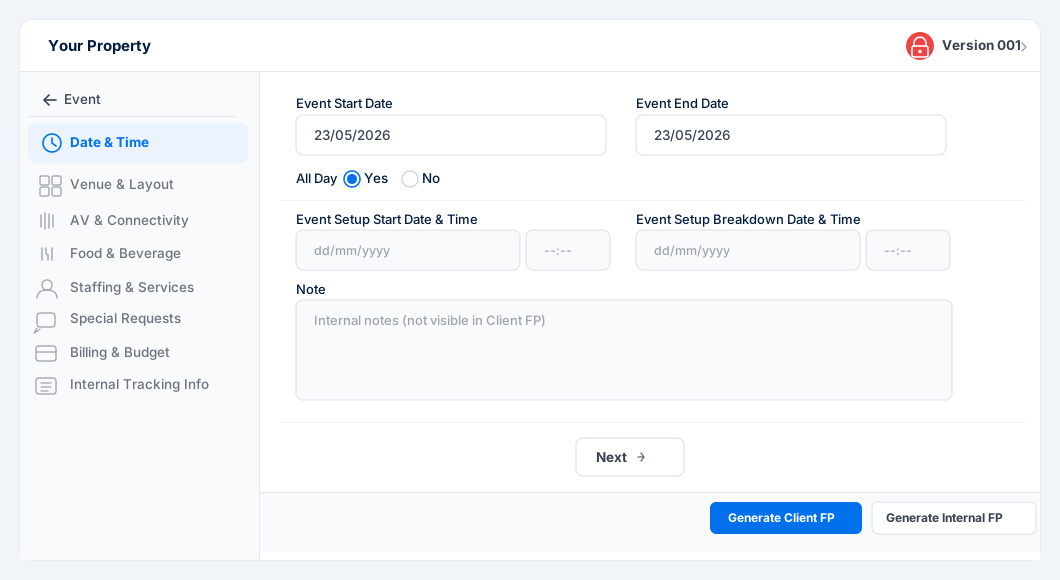
8 configurable sectionsAuto version controlClient & Internal FP outputs
Two Outputs
One form. Two documents.
Generate a client FP and an internal team FP from the same source.
Client FP
A clean, professional document for your event organiser — no internal notes included.
- All confirmed event details
- Share via "Share With Client"
Internal FP
The full version with team notes for ground operations. Visible to your staff only.
- Includes all internal notes
- Distribute via "Notify To Team"
What's Covered
8 sections. Every detail captured.
Fill in what's relevant — all sections are optional.
01
Date & Time
Start, end, setup & breakdown
02
Venue & Layout
Guest count, setup style, linen
03
AV & Connectivity
Mics, projector, speakers, WiFi
04
Food & Beverage
Service style, menu, beverages
05
Staffing & Services
Staff, security, valet, housekeeping
06
Special Requests
Branding, signage, custom asks
07
Billing & Budget
Budget, deposit, payment details
08
Internal Tracking
Sales POC, managers, notes
How It Works
Up and running in minutes.
Six steps from the Spalba dashboard.
Step 01
Navigate to Events
Open the Events Calendar from the left side menu.
Step 02
Create an Event
Click + and fill in the base details — venue, dates, client, event type.
Step 03
Open the FP Form
Click Edit → View Event Form to access the Functional Prospectus.
Step 04
Fill in the Sections
Work through all 8 sections. Add internal notes in each Note field.
Step 05
Lock & Submit
Click Lock Event Form. Status moves to Version 001. Each new lock increments the version automatically.
Step 06
Generate & Share
Generate Client FP to share with the organiser, or Internal FP to notify your team.
Get Started
Ready to run flawless events?
Join 400+ properties already using Spalba to streamline event execution.